User Guide
Your morning recovery briefing — explained in one page. · Last updated: 2026-08-03 · Build 24
TL;DR
Kreev is a morning recovery briefing for your body. Every day at 7 AM, it pulls last night's sleep, your heart rate variability, resting heart rate, respiratory rate, and yesterday's training from Apple Health and your Apple Watch — and tells you in plain English:
- How recovered you are today (a 0–100 score)
- Why you're at that number (a one-paragraph narrative, not a wall of numbers)
- What to do with it (Recovery Focus, Light, Moderate, Active Recovery, or Consolidation)
Kreev compares you against your own 30-day baseline, not population averages — because for metrics like HRV, a number that's alarming for one person is perfectly normal for another. The goal isn't a perfect score; it's stability week-to-week and slow improvement over months.
You'll need: an iPhone on iOS 16+ and an Apple Watch Series 4+ (watchOS 9+) for the full signal set.
You'll want it for:
- A single morning briefing instead of checking five metrics across Apple Health
- Catching slow declines in fitness before you'd notice them yourself (the Boiling Frog detector)
- Connecting the dots between sleep, training, and recovery
- Knowing which day of the week you tend to recover worst, and why
What's included: Free vs Sentinel
Your first 30 days include everything in this guide — every account gets an automatic 30-day Sentinel trial, no credit card required. After that, your scores and metrics stay free forever; the AI interpretation layer becomes Sentinel. Look for a Sentinel tag next to any feature below that's part of the paid tier.
| Free, forever | Sentinel |
|---|---|
| Recovery Score, Strain, VO2 Max (the number) | AI daily narrative, Weekly Debrief, Month in Review |
| Today's overnight metrics (HRV, RHR, Sleep, Respiratory Rate, Steps, Activity) — current-week trends (Sentinel: up to 6 months) | Top Contributing Factors ("Why"), Recovery vs Strain |
| Trends tab charts (current month) | VO2 ACSM ranking, Healthspan Index (5 components), Trends up to 6 months + Long-Term Direction |
| Subjective check-in, illness early-warning banner, 7 AM reminder | Full History tab (Sentinel Pattern, Recurring Bottleneck, Your Patterns, monthly heatmaps, Autonomic Balance), Guardian Alerts |
What's new
See the full changelog for release notes.
What Kreev does
Every morning at 7 AM, Kreev pulls last night's sleep, your HRV, resting heart rate, respiratory rate, and yesterday's training, and gives you a plain-English answer to:
"How recovered am I today, and what should I do with that information?"
That's the whole product. One short briefing, daily. Not another dashboard.
Kreev vs Apple Health
Apple Health stores your numbers. Kreev tells you what they mean today.
| Apple Health | Kreev |
|---|---|
| Stores everything | Synthesizes a few key signals |
| You go check it | It briefs you at 7 AM |
| Numbers | A plain-English paragraph |
| One metric at a time | Connects metrics (sleep → next-day HRV, training → recovery) |
| Reference data | Action context |
Use them together. Apple Health is the truth source; Kreev is the interpreter.
The "you vs you" idea
Kreev compares each morning's readings against your own 30-day average, not a population number. Reason: for HRV especially, two healthy people can sit at completely different "normal" values. A resting HRV of 35 ms might be alarming for one person and routine for another.
So when Kreev says "your HRV is below baseline," it means: lower than YOUR usual. The goal isn't chasing a perfect score — it's stability week-to-week and gradual improvement over months.
How to read the number: 50 means you're at your normal — not half recovered. If you're used to apps that run hot (scores that sit in the 70s and 80s most days), Kreev's scale will feel lower at first. That's by design: the scale is centered on your own baseline, not inflated to feel good. A 45 and a 55 are both "around normal" for you; it's sustained drift below baseline, not a single day's number, that's worth paying attention to.
Plain-English glossary
A few terms in the drill-down screens come from sports science. Translated:
- Baseline — your 30-day average for that metric.
- Z-score — how unusual today is for you. 0 = totally normal. +1 = a good day. −1 = a recovery day.
- Standard deviation — how much your readings normally bounce around. Small = steady; large = variable.
- Strain — how hard yesterday's training was, based on your actual heart rate (TRIMP method). Not the same as Apple's exercise minutes.
- Recovery score — Kreev's morning verdict, combining HRV (35%), sleep (30%), resting heart rate (20%), and respiratory rate (15%).
Your daily flow
- Open the app in the morning — Kreev's 7 AM notification reminds you. If your Apple Watch sleep data is still syncing, you'll see a "Sleep syncing" chip and the score will refine itself once it arrives.
- Read the AI narrative (Sentinel) — the paragraph at the top is the morning briefing. It already accounts for last night's sleep, recent HRV trends, and yesterday's strain. On Sunday, a separate Weekly Debrief card appears below it — it doesn't replace the daily narrative, it adds a week-in-review on top.
- Tap the "How do you feel today?" check-in — five icons from exhausted to energized. One tap a day. Helps Kreev learn whether your numbers match how you actually feel.
- Check the Training Recommendation — Recovery Focus, Light, Moderate, Active Recovery, or Consolidation. A starting point for what to do today.
That's the daily loop. Everything else is for the long game.
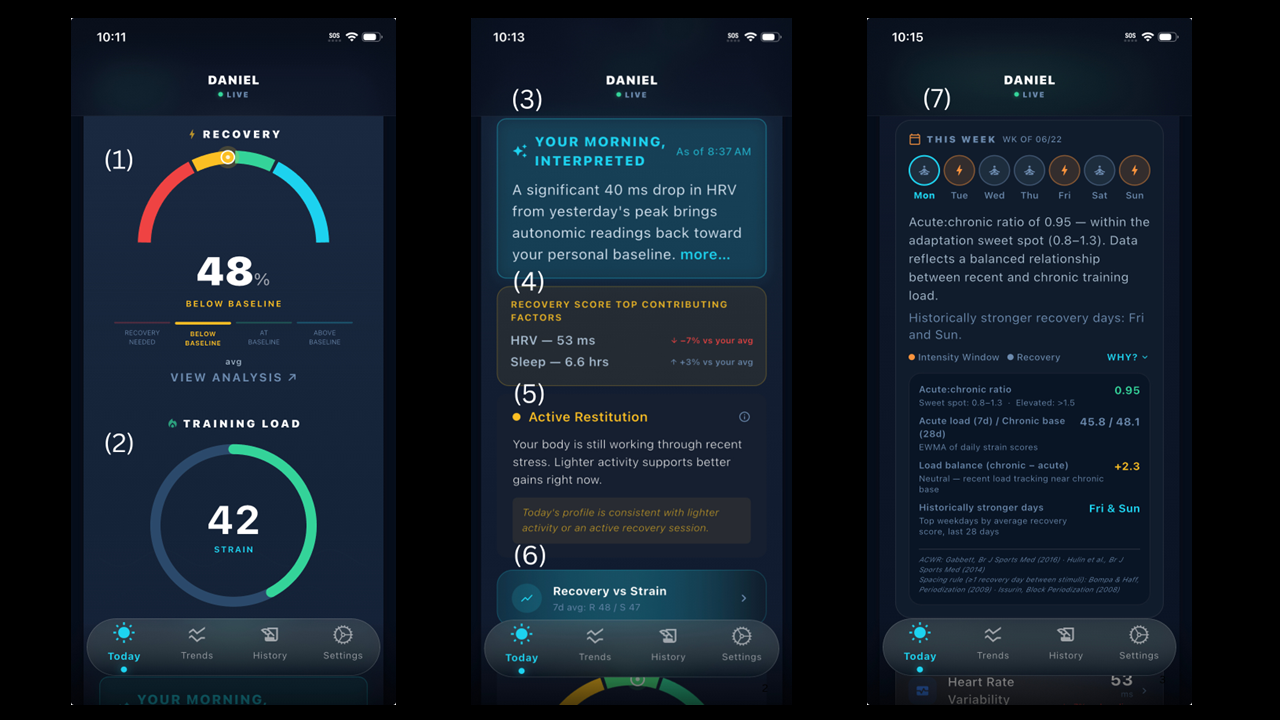
① Recovery score. The big number and surrounding bell-curve arc are Kreev's morning verdict. Tap it for the full breakdown of HRV, sleep, RHR, and respiratory rate contributions.
② Training Load. Your strain score. It increases during the day as you move. Tap on it to open its own drill-down and see your strain distribution during the week, one month and six months.
③ AI narrative paragraph. Kreev's plain-English interpretation of today's signals — sleep, HRV streak, strain debt, and how today compares to your recent norm. Sentinel.
④ Top Contributing Factors. The two metrics most responsible for today's score, shown as personal-baseline deviations. Tap Why? to expand the daily-bottleneck and 7-day-delta context lines. Sentinel.
⑤ Activity Restitution. One of five zones — Recovery Focus, Light, Moderate, Active Recovery, or Consolidation — derived from your 3-day strain average and today's recovery. Use as a starting point, not a prescription.
⑥ Recovery vs Strain drill-down. Opens a 180-day chart of recovery (cyan) vs strain (orange) so you can see whether your training load is in balance. Sentinel.
⑦ This Week card. A week-of view showing intensity-window days, sentinel (stronger-recovery) days, and your acute-to-chronic workload ratio (ACWR). Tap Why? for the methodology citations. Sentinel.
"Is my baseline even any good?"
Fair question, worth a straight answer.
- VO2 Max has well-established population data normalized by age and sex (the ACSM categories). It's the one metric where Kreev tells you outright where you stack up — Poor / Fair / Good / Excellent / Superior.
- For HRV, RHR, sleep duration, respiratory rate, population norms are either weak or so broad they aren't useful. So Kreev's standard is your own trajectory. The rule of thumb:
- If a metric is above baseline and you feel good → stable, healthy pattern. Green light.
- If your baseline itself is moving in the right direction over weeks (Trends tab → Long-Term Direction card, Sentinel), that's the real win. Your baseline isn't fixed — improving it is the goal.
- Worth raising with a doctor (independent of Kreev) if you consistently see resting heart rate above 80, sleep below 6 hours, or respiratory rate above 16 at rest. Those cross clinical thresholds where personal-baseline logic stops being the right framing.
The Boiling Frog — Kreev's slow-decline detector
Quick changes are easy to feel — you know when you've had a bad night's sleep. The dangerous changes are the slow ones: your VO2 Max creeping down 3 points over six months, your sleep getting 20 minutes shorter every week without you noticing, your resting heart rate climbing 1 bpm a month. Each daily reading is within your normal variation, so nothing looks wrong in the moment — but a year later, you've moved.
This is the boiling frog problem, and Kreev runs a dedicated "boiling-frog detector" for it.
In the background, Kreev compares your recent 30 days against the 60 days before that. If a metric is meaningfully drifting away from where it used to sit, you'll see it surfaced on the Trends tab under the Long-Term Direction card (Sentinel) — "HRV moderately declining," "VO2 Max near baseline," "Sleep meaningfully improving."
The card needs about 75 days of data to activate (60 days of reference + 30 days of recent), so it's the long-game surface. Once it's live, it's the card that matters most over a year. The morning briefing is the daily value; the boiling-frog detector is the strategic value.
A faster, daily version of the same idea lives on the History tab → Recurring Bottleneck card: if the same metric (e.g., sleep) keeps dragging your recovery below where it could be this month, that's where you'll see it.
Special case: VO2 Max for non-runners
VO2 Max comes from your Apple Watch. Apple's algorithm is built around steady-state aerobic work, but it doesn't require running — a brisk 20+ minute walk is enough to produce an estimate. Running gives more frequent updates, but a walk does the job.
If you play court sports (squash, padel, tennis), be aware: those produce intermittent HR spikes rather than sustained aerobic output, so VO2 Max updates from them are rare. If your VO2 Max hasn't moved in weeks, it's probably because your Watch hasn't seen a clean aerobic segment to estimate from — not because your fitness is stuck. Treat VO2 Max as directionally trustworthy over months.
For day-to-day intensity in any sport, the Strain score is the better read — it uses your actual heart rate from the workout regardless of activity type.
First weeks — what to expect
Some of Kreev's surfaces need a runway of data before they activate. Your first month will look different from your sixth.
| Surface | Activates after |
|---|---|
| Recovery score, narrative, Training Recommendation | Day 1 (neutral defaults; meaningful around Day 7) |
| Personal baseline numbers | Day 7 — fully informative around Day 14 |
| Your Patterns (History tab, Sentinel) | 60 days of data |
| Long-Term Direction (Trends tab, Sentinel) | ~75 days of data |
| Recurring Bottleneck (History tab, Sentinel) | After 5+ low-recovery days observed |
| Weekly Debrief (Sunday morning, Sentinel) | After 14+ days of data |
| Month in Review (History tab, Sentinel) | Monthly, after 5+ scored days that month |
If a card says "calibrating" or stays empty, that's by design — Kreev would rather wait until it has enough data to say something useful than guess.
Where to find what
Today tab — morning briefing, recovery score, training recommendation, check-in, the "Top Contributing Factors" Why panel.
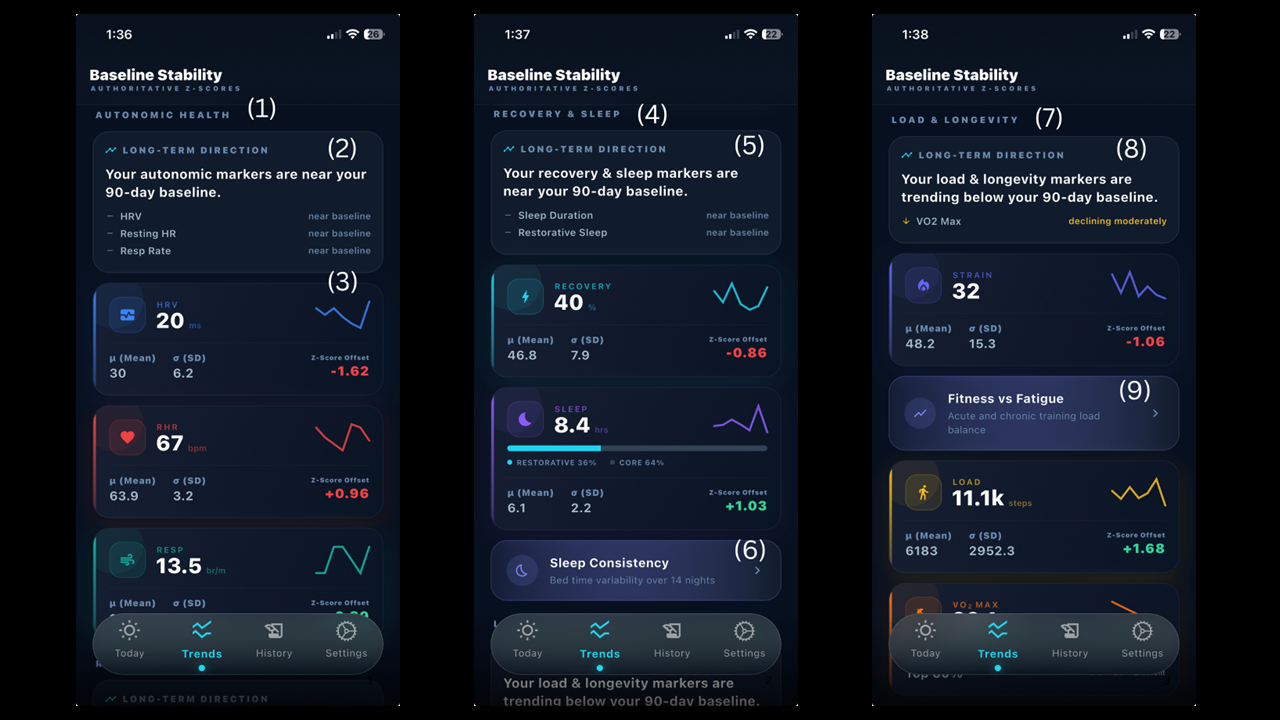
Trends tab — per-metric charts (HRV, RHR, Sleep, Strain, VO2 Max, Respiratory Rate) grouped into Autonomic Health / Recovery & Sleep / Load & Longevity, plus the Long-Term Direction card. Free: current-month charts. Sentinel: up to 6 months of history + the Long-Term Direction cards.
① "AUTONOMIC HEALTH" section header. Groups HRV, Resting Heart Rate, and Respiratory Rate — the metrics that read your nervous system's state.
② Long-term direction. "Near baseline" row. Horizontal grey dash + near baseline. The metric is in line with the prior 60 days — no notable drift in either direction. Boiling-frog detector. Sentinel.
③ Metric tile (e.g., HRV). Each tile shows the metric name, current value, a sparkline of recent trend, and a small delta vs your baseline. Tap any tile to open its drill-down chart.
④ "RECOVERY & SLEEP" section header. Groups your Recovery score and Sleep duration — the daily outputs of recovery.
⑤ Long-term direction. "Near baseline" row. Horizontal grey dash + near baseline. The metric is in line with the prior 60 days — no notable drift in either direction. Boiling-frog detector. Sentinel.
⑥ Sleep Consistency. Bed time consistency, an indication of variability affecting the circadian rhythm.
⑦ "LOAD & LONGEVITY" section header. Groups Strain, Active Calories, and VO2 Max — the metrics that quantify training stimulus and aerobic fitness.
⑧ Long-term direction. "Declining" row. Downward amber arrow + meaningfully declining or declining moderately. This is the boiling-frog signal: the metric is slowly drifting away from where it used to sit. Worth a closer look. Sentinel.
9. Fitness vs Fatigue. The balance between acute and chronic fatigue. This is an indication of fitness adaptation. Sentinel.
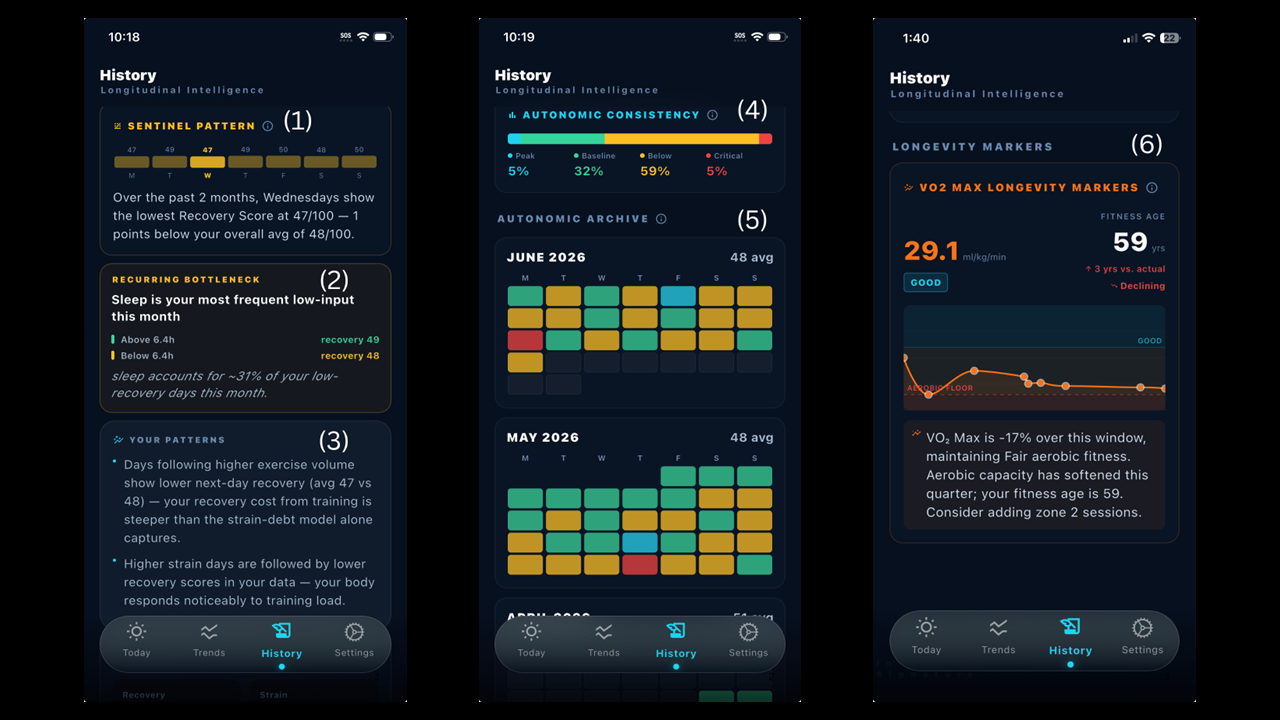
History tab — Sentinel only; Free shows no data here. Monthly heatmap archive, Recurring Bottleneck, Sentinel Pattern (the weekday with your lowest average), Your Patterns (personal correlations), VO2 Aerobic Trend timeline.
① Sentinel Pattern card. A weekday bar chart showing your average recovery score for each day of the week, with the lowest-recovery weekday called out. Helps you spot patterns like "Mondays are systematically low because Sunday-night sleep is short." Sentinel.
② Recurring Bottleneck card. Surfaces the single metric most often dragging your recovery score below the rest of the month, with above/below threshold comparison and percentage attribution. Sentinel.
③ Your Patterns card. Personal correlations Kreev has detected in your data — sleep duration vs next-day HRV, bedtime consistency vs weekly HRV, exercise load vs next-day recovery. Bullet points of your cause-and-effect relationships. Activates at 60 days. Sentinel.
④ Monthly heatmap archive. Up to six calendar-grid heatmaps — one per month, for your six most recent months — each colored by recovery score per day: cyan (Peak), green (Baseline), amber (Below), red (Critical). Lets you compare your current month against recent history at a glance. Sentinel.
⑤ VO2 Aerobic Trend timeline. A sparkline of every VO2 Max reading your Apple Watch has recorded, overlaid against ACSM zone bands (Aerobic Floor, Good, Excellent, Superior) so you can see your trajectory against age-and-sex-normalized thresholds. Sentinel — the free tier shows your latest VO2 Max number only.
⑥ Month in Review. A monthly narrative on the History tab — the same plain-English interpretation as the daily briefing and Weekly Debrief, but summarizing your month once at least 5 days have scored. Sentinel.
Guardian Alerts
Sentinel. A push notification when your recovery state deviates significantly from your baseline — a heads-up outside your normal check-in time, not something you have to go looking for. The trigger thresholds are set by Kreev, not user-configurable; in Settings you control only whether the underlying score value is shown in the notification.
Settings — sign out, notification preferences (including the option to hide your score from lock-screen notifications for privacy), and account controls: Delete Account (full removal, including server-side data) and Reset This Device (clears data locally, keeps your account).
Important: this is not medical advice
Kreev provides personal informatics and analytical insights — not medical advice or diagnoses. If a metric on Kreev concerns you, or your real-world symptoms don't match what Kreev says, see a doctor. Use Kreev to inform your training, sleep, and recovery decisions; use clinicians for medical questions.
Get in touch
This guide updates as Kreev evolves. If something isn't clear, or you've noticed something that doesn't match what's written here, write to us at support@kreev.app — your feedback shapes the next build.
— The Kreev team